Showing posts with label iOS. Show all posts

Feb 2, 2012

Five Best iOS Games Round Up For Today

Summary : It's a busy day, the highly expected Reckless Racing 2 is finally here, along with CrimsonHeart, Gorilla Gondola, Elf Defense Eng, The Lost City. Check them out

  • PandaApp Editor
  • Current Device: HTC Chacha
  • Future Device: iPhone 5.6.7.8...iPad 2.3.4.5...
  • Introduction:Tracing new technology like fashion!

 
1.Reckless Racing 2
Reckless Racing 2, the sequel to Polarbit and Pixelbite's 2010 top-down arcade racer, brings new cars, more challenging tracks, better graphics, with improvements in the car models, together with customised cars. Now live on Pandaapp!
Description
Strap down and prepare for the ride of your life... Reckless Racing is back with more!
 Including a selection of 18 highly detailed cars, ranging from small dirt buggies to fast supercars, and 24 routes in a variety of flavors make this a racer for all tastes - both dirt and tarmac.
 Compete in the Career mode to earn money for new cars and car upgrades. Have a quick race in the Arcade mode with 40 pre-defined challenges. Compete against your friends on the leaderboards in Single Event mode - including Race, Hot Lap and Elimination events.
 Tune your car in the garage to match your driving style with a vast selection of parts and upgrades. Whether you are a reckless power slider or a slick race driver, make your car the way YOU want it.
 * Probably the best power slides in the world
 * Tune and tweak the performance, handling, tires, rims and colors of your cars
 * Shader based game engine with normal maps, reflections, specularity, shadows, particles and more
 * Improved and optimized shaders for iPad 2 and iPhone 4S
 * Online leaderboards with downloadable ghost cars
 * Online multiplayer over the Internet
 * 17 characters, including your favorites from Reckless Racing 1
 * 5 control layouts with customizable button positions
 * Optional assists, such as race lines, mini map, chase camera and more

iOS 5 Bug: Others Can Read Your iMessages Even Swapped SIM Cards

Summary : Are you a user of the iMessage App? Then you should be care about this new iOS but. The bug apparently reveals iMessage to be in contact with an inserted SIM card, and even after the SIM is removed, iMessage conversations from said SIM can still be read.


  • PandaApp Editor
  • Current Device: HTC Chacha
  • Future Device: iPhone 5.6.7.8...iPad 2.3.4.5...
  • Introduction:Tracing new technology like fashion!
 
iMessage was one of the key improvements in the firmware update, allowing iDevices users to communicate for free in an SMS-like infrastructure – much like BlackBerry Messenger and WhatsApp have been doing for a number of years. Providing there is a Wi-Fi or cellular connection available, messages can readily be sent back and forth, with color coordination used to differentiate between a normal message, and an iMessage.
Now though, critical error in iMessage’s make-up has now been glaringly uncovered, courtesy of Gizmodo. The bug apparently reveals iMessage to be in contact with an inserted SIM card, and even after the SIM is removed, iMessage conversations from said SIM can still be read.
The story goes; a young boy visited an Apple Store to get his iPhone looked in to, and one of the branch’s employees took the device out to the back, returning with an apparently repaired iPhone. However, at some stage whilst in the back room, the Apple staffer named "Wiz" had inserted his own SIM in, which for the benefit of testing, wouldn’t normally pose a problem – after all, remove the SIM, and it’s like it was never there, right?
Well, not exactly, no. This boy began to receive a number of Wiz’s iMessages over the following days, whilst the Apple employee was unwittingly sharing his private correspondence with a customer.
The story seems to confirm that iMessage checks any inserted SIM when initializing iMessage. Whilst most of us don’t readily swap SIM cards in the manner of which, say, an Apple employee does, it’s certainly discomforting to know that we could pass devices on to friends, family members, or via eBay, and our private messages could still be transferred to that device.
We had a post about how to protect your iMessage in case your iPhone get lost. Well it seems that's a necessary tip. Leave your thoughts about the issue through the usual mediums jot down below.
via redmondpie

Absinthe Jailbreak Update to v0.4 For Mac OS X, Windows, Linux

Summary : iOS hacker and developer @pimskeks has just tweeted that Absinthe v0.4 is now available to download for Windows, Mac OS X and Linux. Absinthe v0.4 brings support for Mac OS X 10.5 (PPC + Intel) and fixed bug in payload generator that might cause a crash in Windows.


  • PandaApp Editor
  • Current Device: HTC Chacha
  • Future Device: iPhone 5.6.7.8...iPad 2.3.4.5...
  • Introduction:Tracing new technology like fashion!
 
iOS hacker and developer @pimskeks has just tweeted that Absinthe v0.4 is now available to download for Windows, Mac OS X and Linux. Absinthe v0.4 brings support for Mac OS X 10.5 (PPC + Intel) and fixed bug in payload generator that might cause a crash in Windows.
Note:
"Version 0.4
~~~~~~~~~~~
- Mac: added support for OSX 10.5, PPC and Intel CPU
- added consistency check on startup to make sure required files are in place
- Windows: fixed bug in payload generator that might cause a crash"
If you would like to download Absinthe v0.4 for Windows, Mac OS X or Linux you can go to the iJailbreak Downloads Section or use one of the direct links below:
Download Absinthe v0.4 for Windows
Download Absinthe v0.4 for Mac OS X
Download Absinthe v0.4 for Linux x86/x86_64
If you have already jailbroken your iPhone 4S or iPad 2 with the Absinthe jailbreak tool, then there is no need to re-jailbreak. If haven’t jailbroken your iPhone 4S or iPad 2 you can follow our step-by-step guides to jailbreak your iPhone 4S or iPad 2 untethered on the iOS 5.0 and iOS 5.0.1 firmware.
via ijailbreak

Absinthe’s Corona Updated Support iPhone 4S on iOS 5.0

Summary : If your Jailbroken iPhone 4S got iBooks issue, and it’s a big day for for you.Corona was updated this morning to fix the DRM issues in iBooks, Saurik just tweeted that the untether has been updated yet again, this time to resolve problems with the iPhone 4S running iOS 5.

  • PandaApp Editor
  • Current Device: iPhone 3GS, Omnia 7, iPad 1
  • Future Device: iPhone 5
  • Introduction:Techni-Geek live a life in Technicolor!
If your Jailbroken iPhone 4S got iBooks issue, and it’s a big day for for you.Corona was updated this morning to fix the DRM issues in iBooks, Saurik just tweeted that the untether has been updated yet again, this time to resolve problems with the iPhone 4S running iOS 5.
Corona 1.0-8: @sbingner noticed that 1.0-6/7 failed on iPhone 4S 5.0 (the only supported 5.0 build; absinthe’s Corona had worked): fixed.
— Jay Freeman (saurik) (@saurik) January 31, 2012
If you’re having problems with iBooks on your jailbroken device, you can install Corona directly from Cydia. If you’ve already installed Corona, you can simply update it via Cydia and you should be good to go.
via idownloadblog

iOSOpenDev Let You Use Xcode To Develop Cydia Tweats

Summary : The iOSOpenDev project will come with Xcode templates for creating common types of jailbreak tweaks, including Activator listeners, command line tools, dynamic libraries, Notification Center widgets, SBSettings toggles, and Mobile Substrate tweaks. It will even build .deb files of the completed projects for when a developer wants to submit to Cydia for publication. The project should be available soon, but there is not ETA at the moment. We will keep you updated. Stay tuned…

  • PandaApp Editor
  • Current Device: iPhone 3GS, Omnia 7, iPad 1
  • Future Device: iPhone 5
  • Introduction:Techni-Geek live a life in Technicolor!
The iOSOpenDev project will come with Xcode templates for creating common types of jailbreak tweaks, including Activator listeners, command line tools, dynamic libraries, Notification Center widgets, SBSettings toggles, and Mobile Substrate tweaks. It will even build .deb files of the completed projects for when a developer wants to submit to Cydia for publication. The project should be available soon, but there is not ETA at the moment. We will keep you updated. Stay tuned…
Jump over the break to check out a video of iOSOpenDev in action…


Dragon Island: Upcoming Pokemon-like Game for iOS

Summary : In Macworld iWorld 2012, the developers ZigZaGame Inc who are bringing Adventure Bar Story to the App Store. And toucharcade has a good preview this game's story, let's have a look, and it's coming soon:

  • PandaApp Editor
  • Current Device: iPhone 3GS, Omnia 7, iPad 1
  • Future Device: iPhone 5
  • Introduction:Techni-Geek live a life in Technicolor!
In Macworld iWorld 2012, the developers ZigZaGame Inc who are bringing Adventure Bar Story to the App Store. And toucharcade has a good preview this game's story, let's have a look, and it's coming soon:
Dragon Island has you exploring a huge world, battling and collecting over 200 different species of monsters. Each one can be evolved several times, and you can even collect recipes which will allow you to combine two different creatures to create a new hybrid version. Also, you'll be able to battle bosses and claim their spirits in order to summon them in future battles.
Another interesting feature is that there are no healing spells or items in the game. You can return to the main town hub to heal, but if you're out in battle and one of your creatures dies, then they're gone for good. I kind of like this as it adds an element of suspense and risk, and should affect how you go about tackling battles and completing the many dungeons in the game.
To balance this, even though you can only battle with 3 monsters at a time, you'll be able to bring more than that with you as you play. So if you do end up losing one, another monster from your queue will take its place. As you level up in the game, you'll gain the ability to carry more and more monsters with you.
The world which you can explore in Dragon Island is massive, with tons of points of interest to discover. These include towns, forests, random battles, and dungeons. When you come upon a dungeon, it is randomly generated and turns the game into more of a rogue-like, and there will be one infinite dungeon where you can grind and discover monsters and items, as well as compete on a leaderboard for how many floors you can descend.
Finally, the battle system will be a traditional 3-on-3 turn-based affair. Each monster can have up to 4 skills, each assigned a special swipe gesture. Although your character doesn't get involved in battles himself, you can still level him up as you would in a normal RPG, and then his stats will extend to the monsters under his control. In this way you can influence how you will play the game despite the massive number of different monsters in the game which are actually the ones doing battle.
via toucharcade

iPhone 5 Gonna Have NFC Capabilitie, Partnering With MasterCard/PayPass?

Summary : A new report reveals that Apple seems is working on implementing NFC capabilities into the next iPhone and for payment processing, Apple is connecting with MasterCard and Visa.

  • PandaApp Editor
  • Current Device: HTC Chacha
  • Future Device: iPhone 5.6.7.8...iPad 2.3.4.5...
  • Introduction:Tracing new technology like fashion!
A new report reveals that Apple seems is working on implementing NFC capabilities into the next iPhone and for payment processing, Apple is connecting with MasterCard and Visa.
9to5Mac spoke to a well-connected developer at MacWorld who is building a NFC app for the iPhone. When asked why he would do that given the limited NFC support for the device, the developer told the site that he had no hardware knowledge, but he had spoken to Apple iOS engineers on multiple occasions, and they are "heavy into NFC."
When asked how confident he was, the developer said, "Enough to bet the app development on."
Late last week Ed McLaughlin, the head of emerging payments at Mastercard, made some interesting comments about NFC/Paypass to Fortune Company:
"The timeline is always as rapid as it makes sense for consumers," he says. "That's a combination of having a critical mass of the merchants, which is what you're seeing right now, and getting devices into the hands of consumers. I don't know of a handset manufacturer that isn't in process of making sure their stuff is PayPass ready."
So that would include Apple then?
"Um, there are...like I say, [I don't know of] any handset maker out there," McLaughlin says. "Now, when we have discussions with our partners, and they ask us not to disclose them, we don't."
Interestingly, a Visa representative did confirm to Fortune Company that they have talked to Apple about their PayWave system.
"I can't tell you when Apple is going to put NFC in the next version of the iPhone," Bill Gajda, the Global Head of Mobile Product said, "but we've had discussions with them around the PayWave standard and they've asked to look at our specification and certification process so that when they decide to do something those lines of communication are open."
What do you think about it, if iPhone 5 gets NFC Capabilitie?
via iclarified

Create Custom Animated Bootlogos For Jailbroken iOS 5.X

Summary : Change iPhone bootlogo? No clue how many want this, but if you really can change it the logo what you like, that will be very cool.Animate, is a tweak for that and get new updated in Cydia, it allows you to change your iOS boot logo with a custom logo – static or dynamic. The tweak was updated by iH8sn0w with a fix which brings it up to date with iOS 5.

  • PandaApp Editor
  • Current Device: iPhone 3GS, Omnia 7, iPad 1
  • Future Device: iPhone 5
  • Introduction:Techni-Geek live a life in Technicolor!
Change iPhone bootlogo? No clue how many want this, but if you really can change it the logo what you like, that will be very cool.Animate, is a tweak for that and get new updated in Cydia, it allows you to change your iOS boot logo with a custom logo – static or dynamic. The tweak was updated by iH8sn0w with a fix which brings it up to date with iOS 5.

Most of you will probably want to change the default boot logo into an animated one. You should be able to find animated boot logos in Cydia, but if you know how to do your own, custom animations are stored in /Library/BootLogos/YourAniName/ from 0.png to n.png.
animate fix for iOS 4.x.x/5.0.x is available in Cydia via modmyi repo…
NOTE: some users are reporting that this fix is not working properly. If this happens to you, you did it wrong. You need to load Cydia, let it reload data, and THEN install. Otherwise it will install the old fix. ( Opening NC or dock will cancel your data reload )

Jan 31, 2012

Reckless Racing 2 Coming in Next Week to iOS and Android

Summary : Reckless Racing 2, the sequel to Polarbit and Pixelbite's 2010 top-down arcade racer, would be hitting on February 2nd, bringing new cars, more challenging tracks, better graphics, with improvements in the car models, together with customised cars.

  • PandaApp Editor
  • Current Device: HTC Chacha
  • Future Device: iPhone 5.6.7.8...iPad 2.3.4.5...
  • Introduction:Tracing new technology like fashion!

Polarbit has announced via Twitter that their new Reckless Racing 2 game will be arriving on iOS devices on February 2nd. The sequel to Reckless Racing is hoped to bring with it a full single-player campaign with new cars, more challenging tracks, better graphics, with improvements in the car models, together with customised cars.
Developers Polarbit were hoping to launch the new Reckless Racing 2 game before the end of last year, on both the Apple iTunes App Store and the Android Market. However now after a short delay the new racing game for smartphones and tablets is set to arrive next week. Watch the video after the jump for a teaser on what you can expect from the new game when it arrives.
Polarbit has also suggested that the new game mode will also be launching in the new Reckless Racing 2 game. But is kept all details relating to it under wraps until the game’s release. The sequel is also expected to include some crazy micro machines and will allow you to drive like a maniac around the new tracks.
Check out its two trailers:


via geeky-gadgets

C64 Classic 'Barbarian' Coming to iOS Next Month

Summary : Barbarian - The Death Sword will be hitting the App Store early next month. Barbarian is a modern remake of the classic Commodore 64 title Barbarian. Released in 1987, the original Barbarian was a one-on-one fighting game pitting buff and brutal warriors against each other.

  • PandaApp Editor
  • Current Device: HTC Chacha
  • Future Device: iPhone 5.6.7.8...iPad 2.3.4.5...
  • Introduction:Tracing new technology like fashion!
C64 Classic 'Barbarian' Coming to iOS Next Month
 

    Developer Microids and publisher Anuman Interactive have announced that Barbarian - The Death Sword will be hitting the App Store early next month. Barbarian is a modern remake of the classic Commodore 64 title Barbarian - The Ultimate Warrior, also known in the US as simply Death Sword. Released in 1987, the original Barbarian was a one-on-one fighting game pitting buff and brutal warriors against each other.
    Despite the fighting genre being in its infancy, Barbarian was critically acclaimed for its competitive gameplay. However, most of its notoriety outside of the gaming world was garnered by its violent nature where you were able to decapitate your opponent in a shower of blood, as well as the scantily clad models featured on its packaging.
    The new version of Barbarian looks to be a similar one-on-one fighter, but with visuals that have been crafted in 3D. Check out the promo video below, which features both scantily clad women and violence just like its original inspiration:
    One other really cool aspect about Barbarian - The Death Sword that was pointed out in the video is the ability to compete against other players across different platforms. I'm not sure if this extends all the way to the PC and Android platforms, but at the very least you'll be able to play against your buddies no matter if they're on a Mac, iPhone or iPad. Another thing I'd like to find out is if this multiplayer is online or just local. But, it shouldn't be long before we can find out, as Barbarian - The Death Sword is set to launch in the first half of February, and we'll be checking it out when it hits then.
    via toucharcade

    Jan 30, 2012

    How to Jailbreak Your iPad 2 Running iOS 5.0.1

    Summary : These are instructions on how to perform an untethered jailbreak of your iPad 2 running iOS 5.0.1 using Absinthe for Windows.

    • PandaApp Editor
    • Current Device: iPhone 3GS, Omnia 7, iPad 1
    • Future Device: iPhone 5
    • Introduction:Techni-Geek live a life in Technicolor!
    These are instructions on how to perform an untethered jailbreak of your iPad 2 running iOS 5.0.1 using Absinthe for Windows.

    Warning***: Before you continue make sure to do a backup of your device in iTunes as you may lose your Camera Roll during this process.


    Step One
    Download the latest version of Absinthe from here.
    Step Two
    Double click to extract the downloaded archive and launch the Absinthe application.


    Step Three
    As prompted, connect your iPad 2 to the computer via USB. Make sure to remove any passcodes or VPN settings you've previously set.


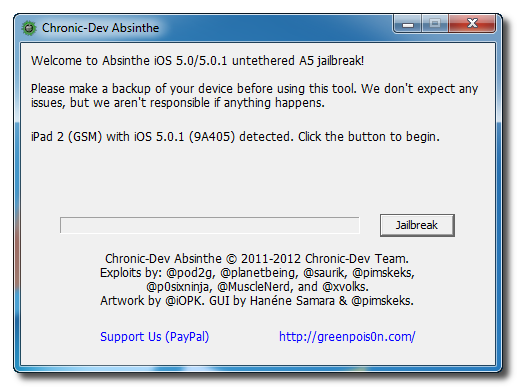
    Step Four
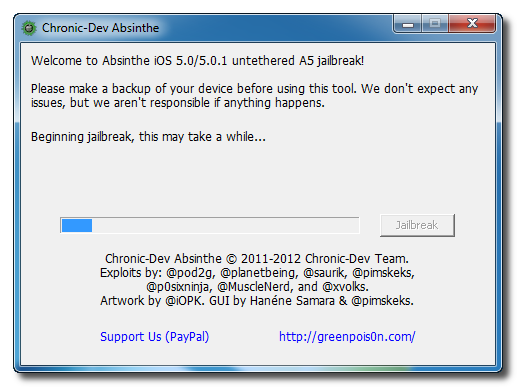
    Click the Jailbreak button to begin


    Step Five
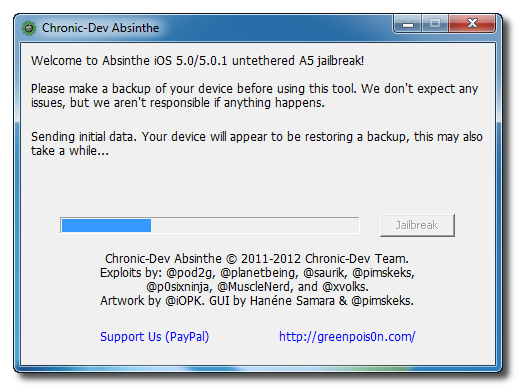
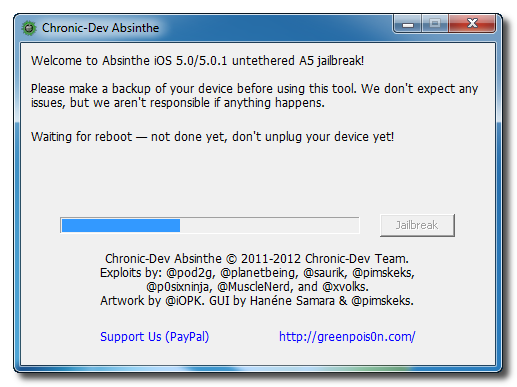
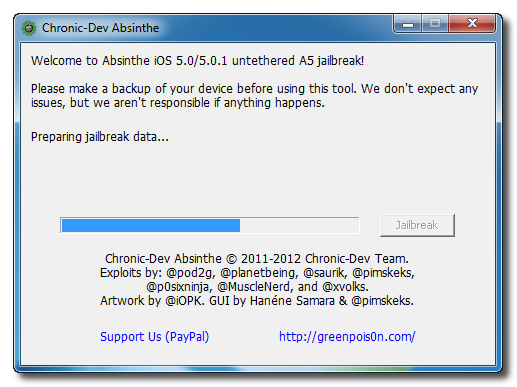
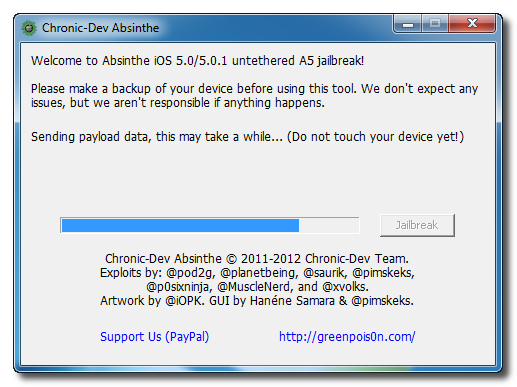
    The application will take you through several steps of the jailbreak: Sending initial data, waiting for reboot, waiting for device to finish booting, Preparing jailbreak data, and Sending payload data.


    Step Six
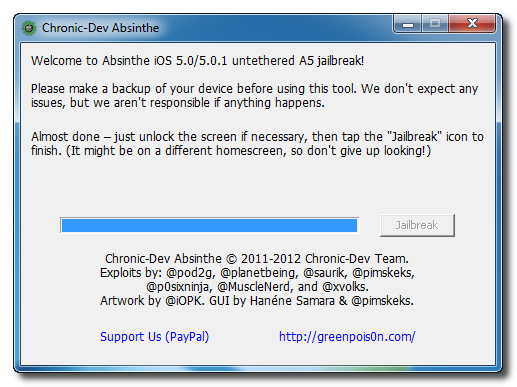
    You will be informed that the jailbreak is 'Almost done'.


    Step Seven
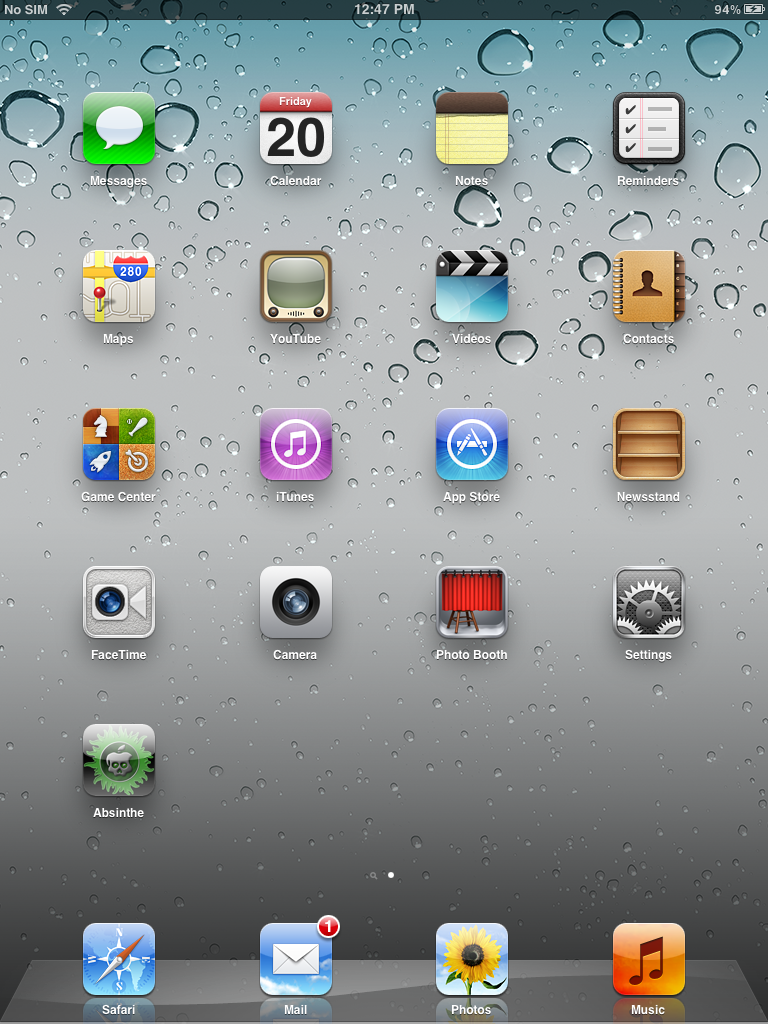
    On you device, locate the Absinthe icon and press it to complete your jailbreak. It could be on any homescreen.


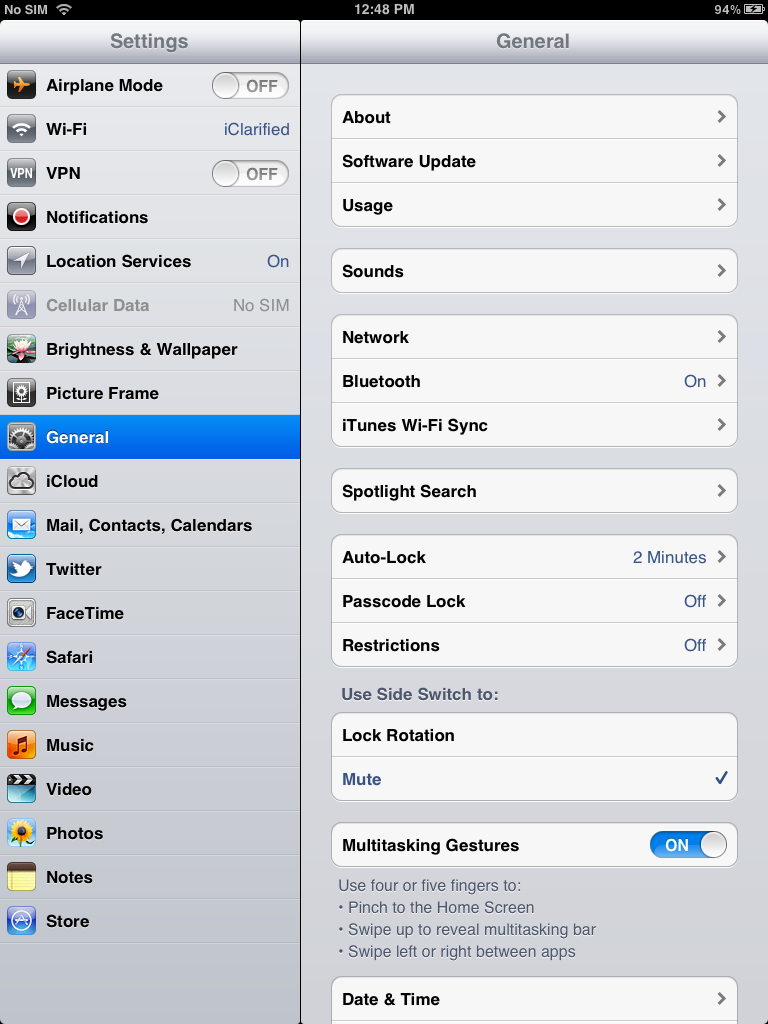
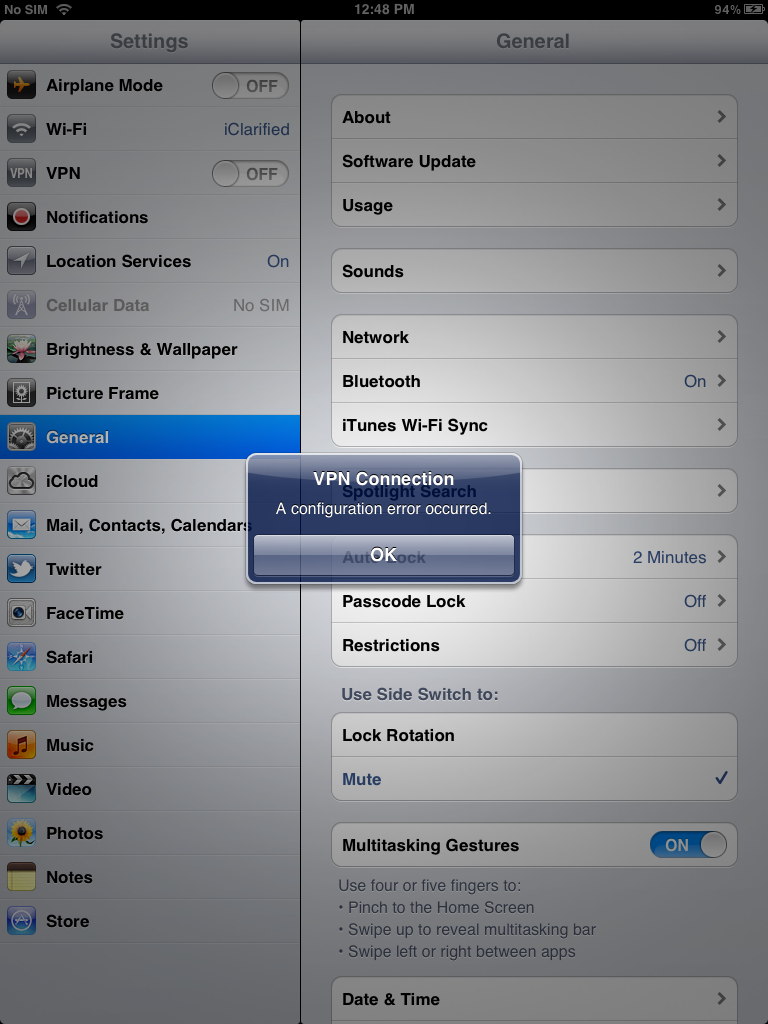
    If the server is down and you get an Error establishing a database connection message then tap the Settings icon on your springboard and turn on VPN.


    You will get a configuration error; however, after about a minute your device will reboot.


    Once your device restarts you will be jailbroken with Cydia on the Springboard!
    via iClarified

    Jan 26, 2012

    Reinventing The Textbook - Apple Held The Education Event [Video]

    Summary : Apple just held its education event as scheduled. On the event, Apple unveiled the iBooks 2 with iBooks Textbooks, iBooks Author for Mac, and iTunes U App for iPhone, iPad, iPod Touch. As the host of the event Phil Schiller said: “Education Is In Apple’s DNA.” Apple is reinventing the textbook.


    • PandaApp Editor
    • Current Device: HTC Chacha
    • Future Device: iPhone 5.6.7.8...iPad 2.3.4.5...
    • Introduction:Tracing new technology like fashion!
    Apple just held its education event as scheduled. On the event, Apple unveiled the iBooks 2 with iBooks Textbooks, iBooks Author for Mac, and iTunes U App for iPhone, iPad, iPod Touch. As the host of the event Phil Schiller said: “Education Is In Apple’s DNA.” Apple is reinventing the textbook.
    Phil Schiller and associates took to the Guggenheim Museum in New York to hold a special event which couldn’t have been further away from the traditional format that we grace Apple product launches for. In a smaller, stripped down event, Apple’s Senior Vice President of Worldwide Marketing introduced a strategy which was all about education. No specifications, aesthetics or launch dates for the media to speculate and report on, instead we saw a straight to the point presentation which featured innovation, new applications and a vision to change the face of education across the world, not for profit, but for the good of change.
    An introduction by Schiller began the event, with an immediate jump into the guts of what the event was about:
    We try to bring the same energy and passion we’ve put into every product we make into our education business as well. There’s something really profound starting to happens, it’s remarkable. We’re seeing that, as students are introduced to iPad, remarkable things are happening. Kids are getting smarter thanks to their tablets, whether they’re older and studying for finals or kids playing a Dora game.
    The tone of the event became clearer with not only focus on education, but more specifically on the benefits that the Apple iPad can provide to those being educated. With the United States being 17th in the world for reading, 21st for Math and 23rd in Science, it isn’t hard to see why Apple feel the education process needs a boost. In an attempt to get more iPads in the educational system, and help students learning accelerate, the company held an event in the Big Apple to introduce two new initiatives.
    Reinventing The Textbook
    Textbooks have been part of education for as long as anyone can remember, and if you visit the library of any educational institute you will undoubtedly find textbooks which pre-date your own birth. That in itself shows one of the major issues of using such books. However, Apple also feels that the use of textbooks in education provides a number of other problems, mainly that they are expensive and wear out easily, they aren’t portable or durable and they aren’t searchable or in some cases very current. However, they are packed full of useful content. They believe that the iPad is the reverse of that and solves all of the shortcoming of textbooks, but lack meaningful content.
    The introduction of a new reading experience for the iPad aims to solve the problem of content by bringing learning to the tablet device. iBooks 2 is a new, free of charge application which brings beautiful, interactive books to the iPad, perfect for learning. The books provide a dynamic, engaging and interactive experience for the reader, making use of multi-touch gestures and finger swiping to navigate through the chapters and pages. The embedded media can be manipulated through a user’s touch to provide more in depth views or more detailed images, or even 3D models which no printed book could compete with. The books are also presentable in two reading formats, activated through the orientation of the device which will appeal to different people. Landscape mode presents rich media to the user whilst changing to portrait forces images and video to take a back seat and makes the text and reading content more prominent.
    The launch of a second application, this time through the Mac App Store will allow authors and developers to create these beautiful books which can then be published to the catalog for sale. iBooks Author is available now for OS X and is a free of charge download. Author is primarily focused on the creation of textbooks, but can be used to create any type of book imaginable. The simplicity of the application removes the challenges which were once faced with other software packages and implements the WYSIWYG interface; allowing the ease of drag and drop. One of the remarkable things about iBooks Author is that it is also compatible with documents from Pages, Microsoft Word and Keynote; meaning, you can drop any document or presentation into it and Author will auto format it for you books as either content or a dynamic widget.
    The books can be made up of text, images, video and of course widgets exist to make things a little more interesting. Developers can also create their own third party widgets through the use of HTML and JavaScript so it is likely we will see a thriving community effort sooner rather than later, with a number of these widgets being made available. By connecting an iPad to the Mac, a book can be sent instantly to the device for testing and reviewing before being uploaded to the iTunes team for review and sale.
    The iTunes U Initiative
    iTunes U has been around since May 2007 and exists to provide education content and lectures through the iTunes store. Educational providers have been able to sign up to the program in order to offer their content for download by users around the world. At present; over 1000 colleges and universities are already signed up for the iTunes U program, which makes it the world’s number one catalog for education content with over 700 million downloads delivered since 2007.
    With iTunes U already being so successful, it may seem difficult to see how it could be improved, or what additional features could be added. However, Apple want the emphasis to be on teachers to do a lot more, and with the introduction of the free of charge, dedicated application, it lets teachers and students do everything they need to right on their iPad. Providers can upload online courses in pretty much any subject or category which users around the world can enroll, free of charge. The course view via the application will provide details of the teacher in charge, a complete breakdown of the syllabus and even additional information like office hours and the credits involved.
    Inside of the application there are entries which allow students to publish notes and posts, as well as important information about what materials might be needed for the course. The beautiful thing about the iTunes U application is its ability to link directly into the new iBooks app, meaning that books can be purchased directly, should any reading material be needed for the course. As well as making notes directly in the application, students can also publish those notes into viewable virtual cue cards from which they can learn and revise.
    The announcements made today may not compare the glamour of launch events which give us things like the iPad 2 or the iPhone 4S, however, it is evident from all of these new free resources that Apple wants to play a huge roll in changing the education system for the better. Phil Schiller uttered some words toward the end of the event which brought back memories of Steve Jobs, "Apple exists at the intersection of liberal arts and technology, and never has that been more evident, that is true today as it ever has been before". They believe that students achievement can be measured by their learning engagement, and any innovations which exist purely to engage people in education around the globe, free of charge, can only be a good thing.
    Videos
    You can watch the stream of the New York event, or download it via iTunes.

    Want More Jailbreak? Then Join Us to Stop SOPA!!!

    Summary : The American congressional SOPA and PIPA bills threaten to destroy the internet as we know it, supplanting the free flow of information with a far-reaching, blanketed, mindless censorship the likes of which we’ve only seen in the most dystopian of popular fiction.

    • PandaApp Editor
    • Current Device: iPhone 3GS, Omnia 7, iPad 1
    • Future Device: iPhone 5
    • Introduction:Techni-Geek live a life in Technicolor!
    The American congressional SOPA and PIPA bills threaten to destroy the internet as we know it, supplanting the free flow of information with a far-reaching, blanketed, mindless censorship the likes of which we’ve only seen in the most dystopian of popular fiction.
    And, unfortunately, jailbreakers might be more immediately affected than anyone (if that’s even possible). iDownloadBlog explained:
    Even though the US Government made jailbreaking legal back in 2010, the distribution of jailbreaking software could be deemed illegal under SOPA because it contains Apple’s [reversed-engineered] IP. That would mean that one phone call from the Cupertino company could effectively shut down sites that host the software.
    Of course, Apple is against the ratification of SOPA and PIPA (we think!), and it’s unlikely Cook and company would turn totally adversarial at the bang of an approving gavel. Still, it’s definitely some (rotten) food for thought, and we hope it’s the impetus you need to get those emails and phone calls out to your state representatives ASAP.
    via appadvice via musicians4freedom

    Get Siri On Older iOS Devices By Restoring From iPhone 4S Backup

    Summary : Everyone wants to have Siri on their iOS devices, but it's not that easy, we have post some guide before to let guys have it, but the proxy problem still bother some people. It’s been made exclusive to the iPhone 4S and even though hackers have tried to port Siri to older iOS devices, it hasn’t been much of a success story. Recently, we told you about the legal port of Siri called Spire, which does work, but not all the time and is quite difficult to setup.


    • PandaApp Editor
    • Current Device: iPhone 3GS, Omnia 7, iPad 1
    • Future Device: iPhone 5
    • Introduction:Techni-Geek live a life in Technicolor!

    Everyone wants to have Siri on their iOS devices, but it's not that easy, we have post some guide before to let guys have it, but the proxy problem still bother some people. It’s been made exclusive to the iPhone 4S and even though hackers have tried to port Siri to older iOS devices, it hasn’t been much of a success story. Recently, we told you about the legal port of Siri called Spire, which does work, but not all the time and is quite difficult to setup.
    Here’s another interesting story from AppleGordon, who reported that he got Siri running on his brand new iPod Touch, just by restoring it from an iPhone 4S backup. Yes, that’s right. There he was with his iPod Touch, jailbroken, trying to get the photos from his iPhone 4S on it, when he decided to try to restore it using an iPhone 4S backup to get it all. Bam! After the restore, Siri and Siri dictation was installed.
    Apparently, Siri didn’t like this whole restoring from a backup thing. He states that it cannot connect to Apple servers and makes his iPod Touch crash and reboot a lot. We are not sure if this story is real, but we had to believe it was after watching this video.

    He also tried this on a Verizon iPhone 4 and it worked. However, restoring from another device’s backup is not really a smart move.
    We would suggest you do not to try this with your daily iOS device. If you do happen to have a spare that you rarely use, then try it out and let us know if  it works. Let us know in the comments!
    via ijailbreak

    Overflow Adds Coverflow to Your Dock Icons

    Summary : Noted jailbreak and App Store application developer Adam Bell added another great tweak to his arsenal: Overflow. The jailbreak-only adjustment brings the Cover Flow effect(like swiping through album covers when rotating the iPhone) to the iOS home screen’s application dock
    • PandaApp Editor
    • Current Device: iPhone 3GS, Omnia 7, iPad 1
    • Future Device: iPhone 5
    • Introduction:Techni-Geek live a life in Technicolor!

    Noted jailbreak and App Store application developer Adam Bell added another great tweak to his arsenal: Overflow. The jailbreak-only adjustment brings the Cover Flow effect (like swiping through album covers when rotating the iPhone) to the iOS home screen’s application dock. As you can see in the video after the break, it works great with Chpwn’s Infinidock tweak —an alteration to iOS that allows users to store an infinite amount of apps in the dock. Bell’s tweak costs $0.99 in the Cydia store, and it works on the iPhone, iPad, and iPod touch. You can watch a video of the tweak in action after the break:

    How to Get iOS 5 to Your iPhone 3G, iPhone 2G, iPod Touch 1G And iPod Touch 2G

    Summary : If you were crying in the corner because Apple did not provide support for your older iDevice, it’s time you get back up and try out Whited00r 5.1. Whited00r 5.1 brings almost all the new features of iOS 5, such as multitasking, Reminders, video recording, service like iCloud and more.


    • PandaApp Editor
    • Current Device: HTC Chacha
    • Future Device: iPhone 5.6.7.8...iPad 2.3.4.5...
    • Introduction:Tracing new technology like fashion!
     
    Last Summer, Apple unveiled the latest version of its mobile operating system, iOS 5. The update contained more than 200 new features including iMessage, iCloud, and a revamped Notification Center. If you were crying in the corner because Apple did not provide support for your older iDevice, it’s time you get back up and try out Whited00r 5.1. Whited00r 5.1 brings almost all the new features of iOS 5, such as multitasking, Reminders, video recording, service like iCloud and more.
    Now the team is back with a customized version of iOS 5. Installing it is as easy as downloading the firmware from the Whited00r website, and running iTunes. But before you get started, there are a few things you should know.
    First of all, the custom firmware is missing some of iOS 5′s biggest features, including Notification Center and the App Store (yeah, no App Store). And its iCloud component is really just a front-end for a redesigned DropBox-sync feature.
    But on the plus side, it does contain several iOS 5 features. And the ever-important multitasking and custom wallpapers are there. It even includes a host of pre-installed jailbreak tweaks and of course, the Cydia Store.
    Although, you will not have the same iOS 5 notifications and we cannot guarantee how smooth it will work on your older iDevice. But, if the happy reviews from happy customers are to be believed, then it must run pretty well. For users who rely on a software unlock, there is custom version that can be installed to preserve the iPad baseband 6.15.00.
    Have you tried Whited00r 5.1 out yet? What do you think?
    via ijailbreak

    iPhone 4S Users Want an Unlock Should STAY on iOS 5.0

    Summary : Contrary to many reports, iPhone 4S owners hoping for a future unlock should not update to iOS 5.0.1 but instead stay on iOS 5.0 to maximize their chances of an unlock, according to MuscleNerd.

    • PandaApp Editor
    • Current Device: HTC Chacha
    • Future Device: iPhone 5.6.7.8...iPad 2.3.4.5...
    • Introduction:Tracing new technology like fashion!
     
    Contrary to many reports, iPhone 4S owners hoping for a future unlock should not update to iOS 5.0.1 but instead stay on iOS 5.0 to maximize their chances of an unlock.

     has confirmed to iClarified that an untethered iPhone 4S jailbreak for iOS 5.0 will be released at the same time as the iOS 5.0.1 jailbreak, or a day or two later. As always, for those looking to unlock, it is standard operating procedure to stay at the lowest possible baseband.
    In fact, its recommended that those already on iOS 5.0.1 should check their build number and downgrade from build 9A406 to 9A405 while Apple is still signing both builds. Due to differences in the basebands, its more likely that an unlock will be found for the earlier build than the later. You can find direct firmware download links here.
    We can't guarantee an unlock will be found for iOS 5.0. However, in November MuscleNerd revealed that an unlock was looking 'very promising' and was able to use an exploit to dump the baseband bootrom. However, it's not clear if or when an unlock based on that exploit will materialize.
    via iclarified

    iOS 5.1 beta 3 Hints Apple is planning deep Facebook integration

    Summary : Evidence that Apple is building system-wide iPhone and iPad integration with Facebook, like it already does with Twitter, has been found in the latest beta of iOS 5.1.

    • PandaApp Editor
    • Current Device: iPhone 3GS, Omnia 7, iPad 1
    • Future Device: iPhone 5
    • Introduction:Techni-Geek live a life in Technicolor!
    Evidence that Apple is building system-wide iPhone and iPad integration with Facebook, like it already does with Twitter, has been found in the latest beta of iOS 5.1.
    Digging through the recently released third beta of iOS 5.1, iMore discovered evidence that Apple could add deep Facebook integration into a future operating system update. In one screenshot shown for the iOS Contacts application, there is an option to enter a person's Facebook user name right below their Twitter account.
    System-wide Twitter integration was one of the most-touted features of iOS 5, which was publicly released last October. After its release, signups for Twitter grew by 25 percent.
    Deep integration with the social networking service allows users to quickly post Web links from Safari or pictures saved in the Photos application to Twitter. Presumably, future iOS integration with Facebook would offer similar functionality, making it easier for users to share information with their friends on the popular website.
    The pre-release build of iOS 5.1 also reportedly includes references to new iPad models named "J1AP" and "J2AP." The references corroborate with rumored code-names of "J1" and "J2" that were first reported last November, when it was said Apple was secretly working on two new iPad models.
    via AppleInsider

    BigBoss Explains Why Jailbreakers Should Update to iOS 5.0.1 Now

    Summary : We have post the warning before, but it might be the right time to remind you again that iPhone 4S and iPad 2 owners should update to iOS 5.0.1 asap, should they want to be able to jailbreak, when that A5 jailbreak is released.

    • Current Device: HTC Chacha
    • Future Device: iPhone 5.6.7.8...iPad 2.3.4.5...
    • Introduction:Tracing new technology like fashion!
    We have post the warning before, but it might be the right time to remind you again that iPhone 4S and iPad 2 owners should update to iOS 5.0.1 asap, should they want to be able to jailbreak, when that A5 jailbreak is released.
    According to recent reports, the Corona exploit has been patched in iOS 5.1. This means the upcoming jailbreak will probably work on iOS 5.0.1 only, and if Apple released iOS 5.1 before the jailbreak is released, then you might get out of luck and unable to jailbreak. BigBoss explains:
        Apple is due to release 5.1 soon. When that happens, they will stop signing 5.0.1. This means you will only be able to restore to 5.1. 5.1 breaks the upcoming jailbreak. If you are currently a 4s owner or an ipad 2 owner, you will want to get your device to 5.0.1 ASAP. This way when the jailbreak is released, you will be able to use it. If you do not restore to 5.0.1 now, in a few days when 5.1 is out, you may never be able to get from 5.0 to 5.0.1 and only option will be to wait again.
    You can either update over the air or by syncing your device with iTunes.

    Twitter Delicious Facebook Digg Stumbleupon Favorites More